Defender
An independent guard for the AI agents in your browser. It tells you when an agent may be near what matters, and it is honest about what it can’t stop.
One mark, four states
No face and no mascot. The SmartPlay S is the Defender, and how it looks tells you where you stand at a glance.
Open
Protection is off. Nothing is being watched.
Locking
Protection is engaging. One end locks and current runs through the S.
Sealed
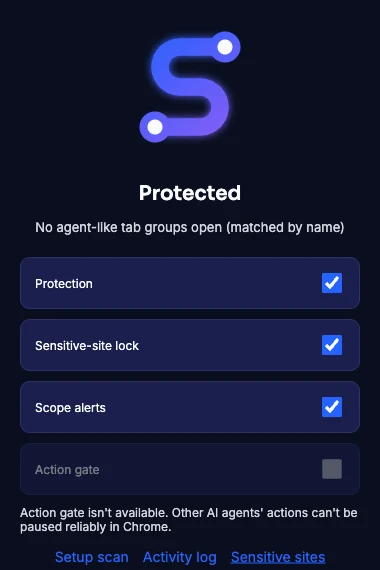
Protected. Both ends locked, the whole S solid and glowing.
Alert
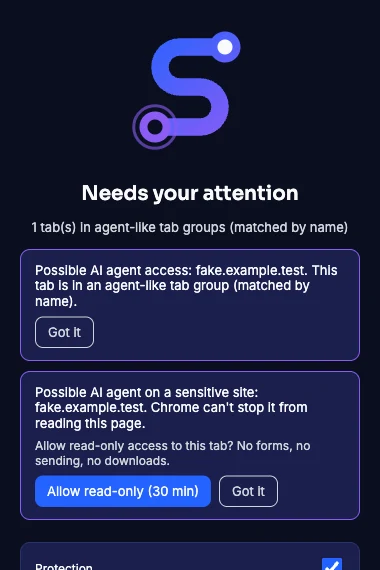
Something needs your attention. The open end rings until you look.
What it does today, and what it can’t do
Security products tend to promise more than they can enforce. We checked what Chrome actually allows an extension to do, and only list what holds up.
- Scope alerts. Warns when a tab lands in a tab group that looks like an AI agent’s.
- Sensitive-site alerts. Email, banking and health portals are on the list by default. If an agent may be on one, Defender tells you.
- Read-only consent. You can give an agent 30 minutes of read-only access to one tab. Defender records it and lets it expire.
- Setup scan. Lists your installed extensions and what each one is allowed to touch.
- Activity log, on your device. What Defender saw and decided. Never what a page said.
- It can’t stop another AI agent from reading a page. Chrome gives one extension no way to block another’s reads.
- It can’t prove which agent owns a tab group. So every alert says “possible”, never “confirmed”.
- It can’t pause another agent’s clicks or sends. That switch is shown greyed out, with the reason, instead of pretending.
Checking what an email wants, not just who sent it
In November a fake job-offer email reached one of our inboxes. It passed every sender check. The domain was real, so the filters let it through. What gave it away was what it asked for.
Passing these proves the email came from where it says. It says nothing about whether it’s safe.
- The display name didn’t match the address it came from.
- You weren’t in To or Cc. You were blind-copied, under a “noreply” address.
- It greeted someone else by name.
- It asked for your cell number, to move the conversation off email.
- It carried a web-page attachment.
Defender’s next step is to read these signals from what’s on screen and switch to Alert, still saying “possible”. First we have to confirm Chrome lets an extension read them in Gmail and Outlook.
Your guard shouldn’t work for the thing it’s guarding
Security sold by the company that makes the AI is like the casino buying the gaming commission.
Yours, not the agent’s
Defender is a separate product with no stake in any AI company. It works for the person at the keyboard.
On your device
Settings and the activity log stay in your browser. No page text leaves it.
Says “possible”
When it can’t know something for sure, it says so instead of guessing.
Want to test Defender?
It runs as a Chrome extension in a test profile with fake data while we finish the lab work. Ask, and we’ll get you a build.
Ask to test it →